
Solution for Training / L&D
Training platform for L&D teams
Publish more courses with the same team: Simón turns your material into micro-lessons with instructional design and shows you real completion by branch, area and person.
Onboarding 2026
Last 30 days
- enrolled
- 248
- completed
- 201
- completion rate
- 81%
- average score
- 89/100
The short answer
What does a training platform like Simón solve for an L&D team?
The production bottleneck. You upload the material that already exists (PDF, Word, PowerPoint, Excel or images) and Simón proposes the outline and writes the lessons, video scripts and assessments. Your team reviews and approves every stage before publishing.
Then it takes each course to frontline staff's phones in 60-to-90-second lessons and measures what matters in a training plan: who finished, who understood on the first try and which topic needs reinforcing, by area, branch and person.
Whatever the AI generates always goes through your approval before it's published. And your catalog stops aging: you update a piece of content and it's republished the same day.
How a course gets made
From your material to a published course, in under an hour
Upload your sources
PDF, DOCX, PPTX, XLSX, CSV or images up to 50 MB. Simón reads them once and keeps them in your library to reuse in other courses.
Review the outline
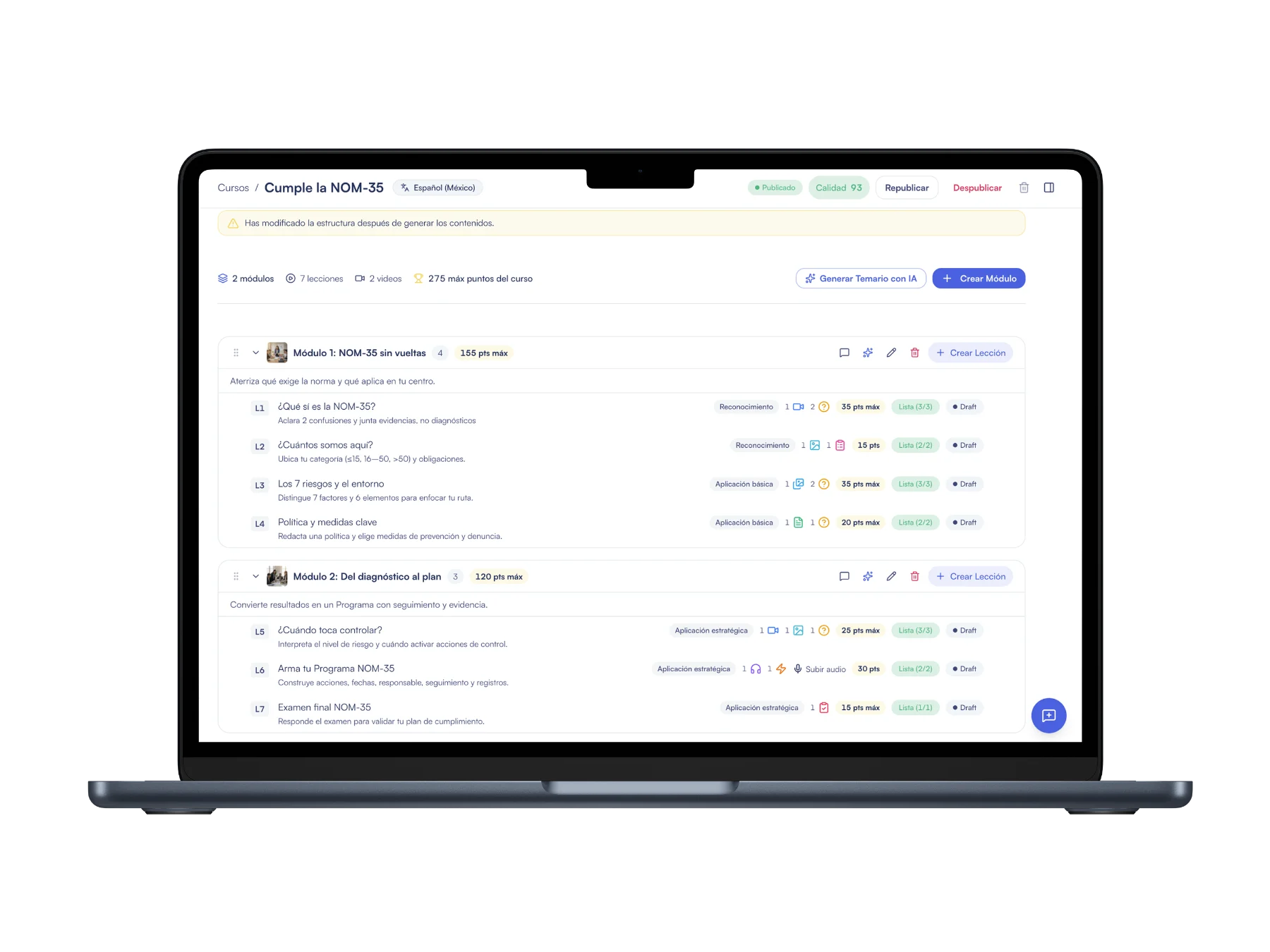
Simón proposes modules and lessons with their cognitive level and the skill each one builds. You edit it before a single piece of content is generated.
Generate the content
Video and audio scripts, documents, quizzes, surveys, activities and a final exam, with a cover for the course and for each module.
Publish with a quality score
Before publishing you see a 0 to 100 score with what the course is missing, such as a final exam, and you decide with that information.
From your material to a course
An outline with a method, ready to review
Upload the manual and Simón proposes modules and lessons by learning level; your team reviews, adjusts and publishes, and every course comes with its quality score.
onboarding-manual.pdf
PDF · 32 pages
Proposed outline
- Welcome and cultureReady
- Your first day in storeReady
- Health and safetyGenerating
Microlearning for companies
60-to-90-second lessons with instructional design built in
Every course starts from the learning objective and follows already validated microlearning rules, with human approval at every stage.
If your team works with its own model, you can turn off Simón's pedagogical model: the AI then uses exactly the content types and number of lessons you specify.
- One topic per lesson and short scripts
- Assessment with a chance to retry
- Cognitive level per lesson: recognition, basic application and strategic application
- Nine formats: video, audio, document, carousel, infographic, quiz, survey, exam and activity
Tools for your training team
Produce, maintain and prove results
Course quality score
Checks 21 pedagogical rules across four levels (course, module, lesson and content) and tells you what's missing as advice. It doesn't block anything: you decide whether to publish.
Add a module or a lesson with AI
When new material arrives for a course that's already produced, you generate just that module or lesson from a file or a description, without touching what's done.
Export as SCORM, PDF or Excel
SCORM 1.2 or 2004 to load the course into your LMS, a configurable PDF for offline review and the outline in Excel to review it with other teams.
Simón course library
Add a course from Simón's catalog to your account as your own draft: you edit it, adapt it to your operation and publish it like any other.
Reports by area and person
A completion and comprehension dashboard, seven predefined reports, your own cuts and scheduled email delivery in Excel or CSV.
Regenerate without losing work
If you regenerate the outline, the previous version is archived with its scripts and videos, and you can restore it.
Published results
Real completion, not just content sent
Completion rate
Observed in programs where Simón took part, against a 15% benchmark average for traditional formats.
Worker CSAT
Satisfaction reported by people who took the lessons on the floor.
Program NPS
Measured with floor users at the close of each program.
Applied what they learned
Put at least one skill into practice in the week after the course.
Data from the first half of 2026 (January to June) in the programs Simón took part in. On-the-job application comes from the impact report (closing survey, self-reported).
Frequently asked questions from training teams
What formats can I upload to build a course with AI?
PDF, Word (DOCX), PowerPoint (PPTX), Excel (XLSX), CSV, text and PNG or JPG images, up to 50 MB per file. Older Office formats (.doc, .ppt, .xls) need to be converted to their current version or to PDF first.
What pedagogical backing does AI course generation have?
It's based on Backward Design (we start from the learning objective) and on the SAM model, with human approval at every stage. Each course develops 2 to 3 skills from the World Economic Forum framework (skills for 2030), with already validated microlearning rules: one topic per lesson, short scripts and assessment with a retry opportunity.
How do I build a training plan with Simón?
Assign each course to the workspaces, areas or sub-areas that need it, publish it and track compliance in the reporting section. There are predefined reports for compliance by area, by workspace and by course, for users who haven't started and for those who never signed in, and you can schedule them to go out by email.
Can I edit what the AI generates?
Yes, all of it. The outline is reviewed and edited before the content is generated, every lesson and piece can be edited afterward, and if you regenerate the outline the previous version is archived and can be restored.
Does Simón replace our LMS?
Not necessarily: they can coexist. Your LMS holds the formal, certifiable record and Simón handles daily reinforcement on the floor. You can export any course as SCORM 1.2 or 2004 to load it into your LMS.
Keep exploring
More for training teams
AI courses
How Simón writes the course from your material, with your approval.
Simón vs LMS and Moodle
How Simón works alongside your LMS and what it adds on the floor.
Simón vs AI video generators
Why a video is not a course, and what is missing after you generate it.
Reports by branch
Completion and comprehension by area, course and person.
Pricing
From $250 USD a month, by people and AI courses.







Build your next course with Simón
Book 30 minutes: bring a manual or a deck and we'll show you the outline, the content and the quality score of the course Simón builds from it.
No card · Cancel anytime
Multi-country operation, bulk user onboarding or HR integration? We support you site by site.